


Budget App & Tracker: Spendee
4.31.60K Reviews
App Specs
- Version
- 5.6.1
- Updated On
- License
- Free
- Downloads
- 1,000,000+
- Developer
- SPENDEE a.s.
- Categories
- Finance
- Platform
- Android
Screenshots

 Analysis by AppCompare
When money feels hard to keep track of, the difficulty is often not a lack of effort but the number of small decisions involved: remembering purchases, sorting them later and working out what is still safe to spend. I find a budget tracker most useful when it makes those steps feel manageable rather than turning them into another chore. Spendee is built around that everyday job, and its clearest strength is giving spending a visual shape you can review at a glance.
How Spendee fits different routines and abilities
I look at Spendee as a tool whose usefulness depends less on mastering every option and more on finding a comfortable way to check in with money. A visual overview can help some people spot patterns quickly, while others may prefer to focus on individual amounts and categories. The next section considers how those different preferences affect everyday navigation and readability.
Readability and navigation
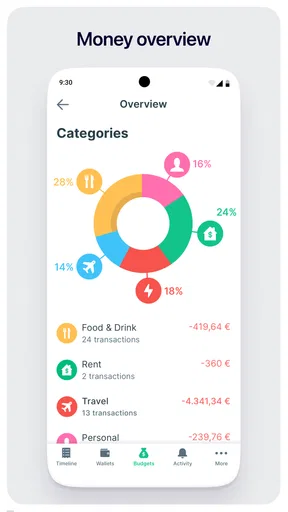
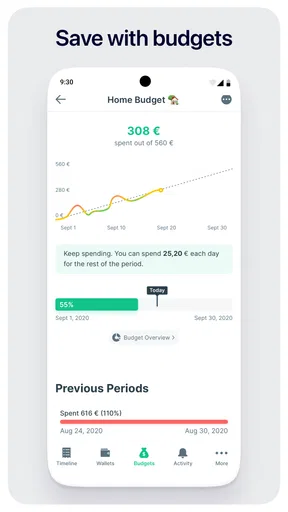
Spendee is a finance app from SPENDEE a.s., and its interface aims to keep routine money tracking approachable. In my experience, the visual summaries help make categories and spending patterns easier to grasp than a long transaction list alone. That can be especially useful if you understand information more quickly when it is shown as a chart, though anyone who prefers figures and text may still want to inspect individual entries rather than rely on a graphic.
The app has been around since November 13, 2013, and its current version is 5.5.50. It is free to download, with in-app purchases priced from $1.99 to $119.99 per item. It is rated for Everyone and requires Android 7.0 or later. On Google Play, its average rating is 4.4 from around 62,000 ratings, and it has more than 1 million installs. Those figures suggest broad familiarity, but they do not tell you whether its particular way of presenting money suits your habits; the best test is whether you can review and update your own spending comfortably.
Motor and sensory considerations
For day-to-day use, the choice between manual entry and bank connection can make a meaningful difference. Manual logging gives you control over what goes into the budget, but it depends on being able to enter transactions regularly. A bank connection can reduce repeated typing, although syncing may take time, so it is not always the most dependable option when you want to check a very recent purchase. If tapping through several entries is tiring or inconvenient, consider whether automatic tracking works reliably with the accounts you use before building your routine around it.
Charts can make trends easier to notice, but a visual display is not automatically easier for everyone. I would use the graphs as a quick overview, then check the underlying amounts when a category looks surprising. Likewise, alerts can help draw attention to a budget getting close to its limit, but they work best as a nudge rather than a substitute for checking whether a purchase is necessary. This balance matters for anyone who finds frequent notifications distracting or prefers to review finances at a set time.
Situational access: shared money, travel and busy days
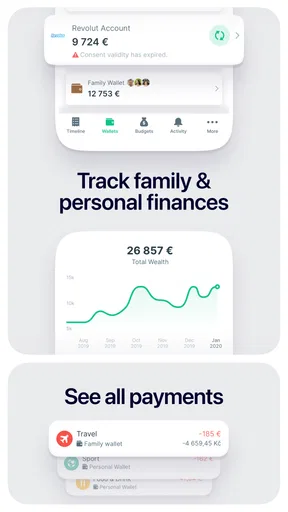
Shared Wallets are a practical option for household expenses because people can add costs to a common space instead of passing notes back and forth. For example, roommates could record cleaning supplies and groceries as they buy them, then look at the shared activity when they settle up. The benefit is a clearer record; the trade-off is that everyone needs to use the same process consistently. If one person logs purchases and another does not, the shared picture becomes incomplete.
Worth Reading Before You Choose

EA SPORTS FC Mobile 26 Is a Bigger Football Game, but It Takes Time

Flipboard Shows What News Apps Must Do Beyond the Feed

Switching to Android Auto Means Rethinking Your Driving Routine

Google Calendar Makes a Crowded Week Easier to Manage

Ludo King Makes the Most of the Minutes Between Plans

Baby Panda World Brings Quick Play to Modern Phones, but Its Game Library Feels Busy
Multi-currency support is relevant for people who travel or manage spending in more than one currency. It can help keep those expenses visible alongside ordinary budgets, but I would still check entries carefully after a trip rather than assume every transaction has appeared promptly. Bill reminders also suit a packed routine: setting them up in advance can make recurring obligations harder to overlook. They are most useful when you treat them as prompts to verify a payment, not proof that it has already been made.
Remaining barriers and trade-offs
The most important friction is the maintenance a budget requires. Even with bank syncing, delayed transactions can leave the available picture temporarily behind real life. Manual entry avoids waiting for a sync but asks you to remember small purchases, which is easy to stop doing during a busy week. I recommend choosing one dependable check-in time—perhaps after dinner or when reviewing the week—rather than trying to keep the budget perfectly current every minute.
Some advanced capabilities sit behind paid options, so free access may not cover every workflow a person wants. The range of in-app purchase prices is broad, which makes it sensible to decide what you actually need before spending: start with the basic tracking routine, then consider a paid feature only if you can name the problem it solves. People who want a completely hands-off system, or who need every transaction to appear immediately, may be happier with a bank’s own tools or another service that better matches those expectations.
Who benefits most from this approach
I see Spendee as a good fit for someone who wants to understand spending categories without building a spreadsheet from scratch. It is especially useful if you are trying to notice habits—such as frequent small food purchases—rather than manage complex financial planning. A student keeping an eye on discretionary spending, a couple organizing shared costs, or a traveler tracking purchases across currencies can each use its structure for a different purpose.
It is less suitable if your priority is investment analysis, detailed tax preparation or a fully automated financial dashboard. A spreadsheet may be better for people who want complete control over formulas and custom reporting; a bank’s own app may be quicker for checking balances and recent transactions. Spendee occupies a middle ground: more organized than a notebook, more visual than a basic transaction history, but still dependent on the quality of your entries and the reliability of syncing.
Why Spendee caught my eye
I’ve tried a handful of budgeting apps over the years, but Spendee stands out for a few reasons. First off, its user-friendly interface is a breath of fresh air. I mean, who wants to spend hours just learning how to navigate an app? Not me! Right from the get-go, Spendee makes it super simple to track your expenses and income.
Setting up a budget that stays useful
Getting started with Spendee is a breeze. After downloading it from the App Store or Google Play, I was prompted to set up my first budget. The app asked me for my income, regular expenses, and any financial goals I had in mind. This step-by-step setup was straightforward, and within minutes, I had a clear picture of where my money was going.
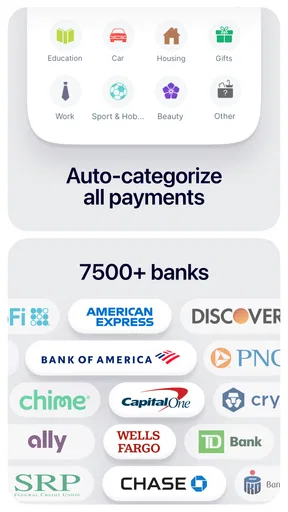
One cool feature during setup was the option to connect my bank accounts. This means Spendee can automatically track transactions, saving me the hassle of manual entries. If you’re a bit wary of privacy, don’t worry. You can still enter transactions manually if that's more your speed. It’s nice to have options!
Design and usability in practice
The design of the app is sleek and modern. The colors are pleasing to the eye, and the layout is intuitive. Everything you need is right where you’d expect it to be. Plus, the app features visual graphs and charts that make understanding your finances a lot less daunting. Seeing my spending habits in a pie chart format was a real eye-opener!
Features that make a difference
Let’s talk features. Spendee offers a ton of them, but I’ll highlight the ones that genuinely make life easier.
- Shared Wallets: This is perfect for families or roommates. You can create a shared space where everyone can input their expenses, making it easier to manage joint finances.
- Customizable Budgets: Whether it's for groceries, entertainment, or saving for a rainy day, you can set specific budgets and get alerts when you’re approaching your limit.
- Currency Support: If you’re a frequent traveler or have accounts in different currencies, Spendee has got you covered with multi-currency support.
- Bill Reminders: Never miss a payment again! You can set reminders for all your bills and subscriptions.
Room for improvement
No app is perfect, and Spendee has its quirks too. Occasionally, the bank sync feature can be a bit slow. There were times when I had to wait for transactions to appear in the app. Also, while the free version is quite robust, some of the more advanced features are locked behind a paid tier. It’s something to consider if you’re planning to fully leverage the app’s capabilities.
A realistic routine and inclusive verdict
Imagine checking your budget before a grocery run, then recording the purchase while the receipt is still in your bag. At the end of the week, you can use the category view to see whether the total reflects your actual habits, and adjust the next week’s limit if it does not. If entering transactions on the go is awkward, you can instead keep receipts and add them during a calm check-in. That small change makes the app less dependent on constant attention, while still giving you a useful record.
For a first-time budgeter, I would begin with only a few categories that matter most—such as groceries, transport and subscriptions—rather than trying to classify every possible expense from day one. This keeps setup lighter and makes alerts more meaningful. Once the routine feels natural, add more detail where it helps answer a real question. The trade-off is that a simpler budget gives less detail, but a budget you actually maintain is more useful than an elaborate one you abandon.
Accessibility in practice also depends on context: whether you can comfortably read the screen, make selections, and review figures when you need them. I would try the core tasks before relying on it for shared household planning: create a budget, enter a purchase, and find the resulting category total. If any of those steps feels difficult on your device, a simpler bank interface or a paper-and-spreadsheet method may be a better fit. Spendee’s visual approach can clarify money for many people, but it is not a universal solution for every sensory or motor preference.
Final thoughts
Overall, Spendee has been a game changer for me. It’s made budgeting much more accessible and even a bit fun. The app’s ability to break down data into digestible chunks with charts and graphs makes it easier to understand where my money is going. If you’re looking for a way to take control of your finances without feeling overwhelmed, Spendee might just be the app you need.
So, if you’re ready to unravel the mystery of your finances and maybe save a few bucks along the way, give Spendee a whirl. You might be surprised at how empowering managing your money can be!
Pros
- User-friendly interface simplifies budgeting.
- Customizable categories for personalized tracking.
- Syncs with multiple bank accounts seamlessly.
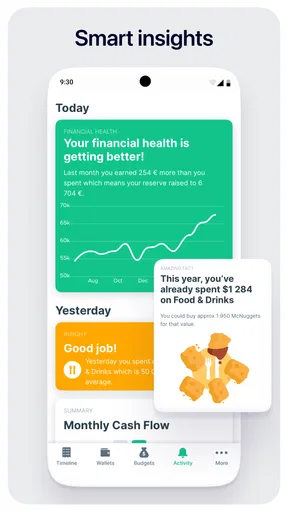
- Offers insightful spending analytics and reports.
- Supports multiple currencies for global users.
Cons
- Limited features in the free version.
- Some features require a premium subscription.
- Occasional syncing issues reported with banks.
- No investment tracking options available.
- Limited customer support response time.
FAQs for Budget App & Tracker: Spendee
What features does Spendee offer to help manage my budget effectively?
Spendee provides a comprehensive suite of features designed to help you manage your finances with ease. It includes expense tracking, budget planning, and the ability to link directly to your bank accounts for real-time updates. Additionally, it offers customizable categories, insightful financial reports, and the ability to share budgets with family or friends.
Is Spendee secure enough for linking my bank accounts?
Yes, Spendee prioritizes user security and employs advanced encryption protocols to protect your financial data. The app uses bank-level security measures and does not store any of your banking credentials. This ensures that your sensitive information remains confidential and safe from unauthorized access.
Can I use Spendee offline, and will it sync when I'm back online?
Spendee allows offline functionality, enabling you to log expenses and manage your budget without an internet connection. Once you reconnect to the internet, the app will automatically sync your data across all devices. This ensures that your financial information is always up-to-date and accessible.
Does Spendee offer customizable budget categories?
Yes, Spendee provides customizable budget categories to cater to your personal financial needs. You can create and modify categories to better align with your spending habits. This level of customization helps you track expenses more effectively and provides a clearer overview of your financial situation.
Is there a free version of Spendee, and what are the limitations?
Spendee offers a free version with basic features such as manual expense tracking and budget planning. However, premium features like bank account linking, advanced reports, and shared wallets require a subscription. The free version is suitable for those looking to get started with budgeting, while the premium version offers a more comprehensive financial management experience.


